
Time Card Calculator with Lunch Break
A time card records when you clock in, go to lunch, come back and clock out. Enter those four punches for each day — or just in and out with an automatic lunch deduction — choose how minutes are rounded, and the calculator totals regular hours, overtime and gross pay for a weekly or two-week pay period, ready to print and sign.
- Free to use
- No sign-up
- Runs in your browser
Time card calculator
Time Card Templates
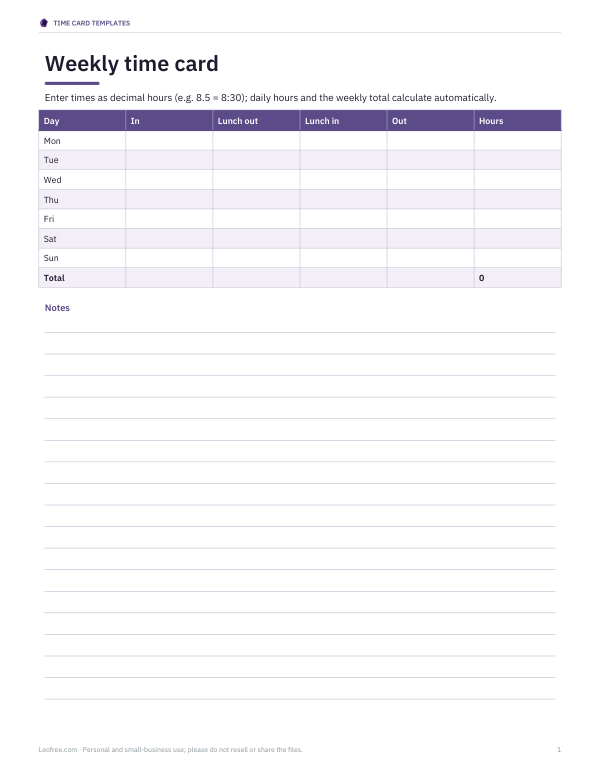
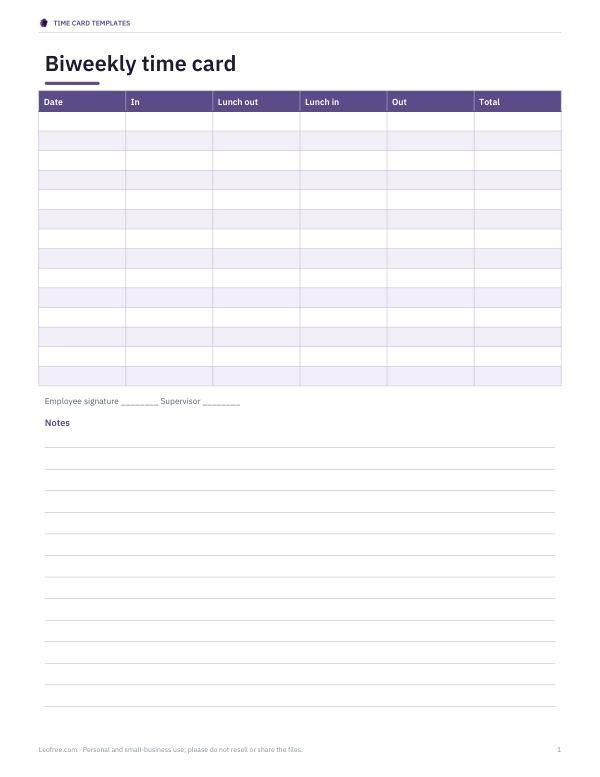
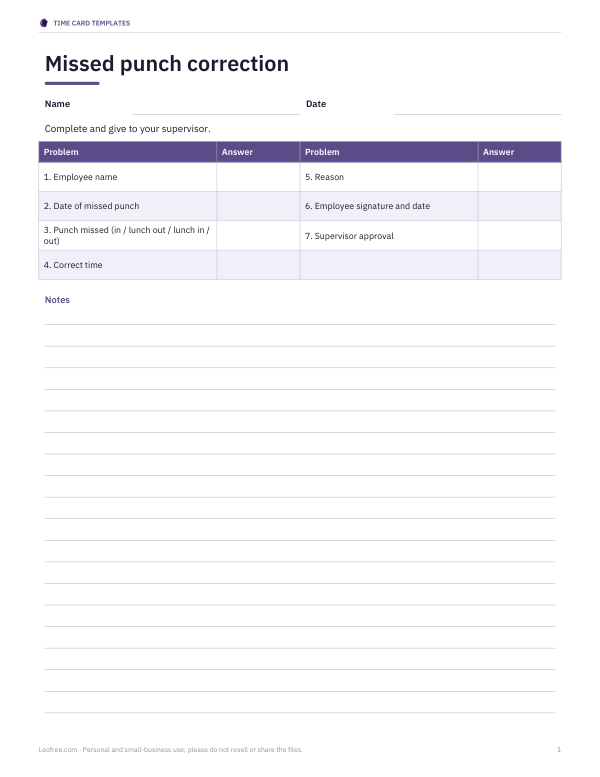
Printable and Excel time card templates: weekly and biweekly time cards with lunch columns, an Excel time card that totals hours and overtime, a missed-punch correction form and a PTO request form.
- Weekly time card (XLSX)
- Biweekly card (PDF)
- Missed punch form (PDF, DOCX)
- PTO request (PDF, DOCX)
Formats: XLSX, PDF, DOCX. Instant download after payment (link valid 72 hours, up to 5 downloads). AI-assisted: the templates were drafted with AI help and reviewed and laid out before publishing.
$5.00 USD, one-time 4 files · about $1.25 each
- Instant download
- 7-day refund
- Secure checkout by Stripe
7-day money-back guarantee. Full refund within 7 days of purchase, even after you download.
Free sample: Biweekly Time Card (PDF, 60 KB)
Full refund within 7 days — see the refund policy and license.
Free printables
Single sheets you can print right now, no sign-up. The full pack adds every sheet in one download plus the editable files.
 Printable PTO Request Form
How the time card works
- For each day, enter the clock-in time, lunch out, lunch in and clock-out time.
- Hours worked = (clock-out − clock-in) − (lunch in − lunch out).
- If a day has no lunch punches, an automatic deduction can be applied for long shifts — a common policy for unpaid meal breaks.
- Punches are rounded first if you choose a rounding rule.
- Daily hours are added up by week; hours over 40 in a week (or over 8 in a day, if chosen) become overtime.
- Gross pay = regular hours × rate + overtime hours × 1.5 × rate (+ double time where applicable).
Overnight shifts are handled: if the clock-out time is earlier than the clock-in time, the calculator assumes the shift ended the next day.
Rounding rules explained
| Rule | How it works | Example: in at 8:53 |
|---|---|---|
| None | Exact minutes | 8:53 |
| Nearest 5 minutes | Round to the closest 5-minute mark | 8:55 |
| Nearest 6 minutes | Tenths of an hour (0.1 h) | 8:54 |
| Nearest 15 minutes (7-minute rule) | 1–7 minutes past a quarter round down, 8–14 round up | 9:00 (8:53 is 7 minutes before 9:00) |
Under US federal rules, rounding to the nearest 5, 6 or 15 minutes is allowed only if it averages out over time and doesn’t consistently favour the employer; some states are stricter. Your employer’s written policy should say which rule applies.
Worked example
Alex clocks in at 8:58, goes to lunch at 12:02, returns at 12:31 and clocks out at 17:04 on Monday: 8 h 6 min on site minus a 29-minute lunch is 7 h 37 min, or 7.62 hours. On Wednesday Alex forgets the lunch punches (8:55 to 17:00); with a 30-minute automatic deduction the day counts 7 h 35 min. Over the week the calculator totals the five days, and at $18.50 an hour with overtime after 40 hours it shows regular hours, any overtime and the gross pay.
Lunch breaks and the law
Rules on meal breaks vary widely. US federal law doesn’t require meal breaks, but if an employer gives one of 30 minutes or more and the employee is fully relieved of duties, it can be unpaid; short breaks of 5–20 minutes are usually paid. Several states — California, New York and others — require meal breaks after a certain number of hours. In the UK, workers over 18 are generally entitled to a 20-minute rest break when working more than six hours. Check the rules that apply to you.
Weekly and daily overtime
| Rule | Where it is typical |
|---|---|
| Over 40 hours in a workweek at 1.5× | US federal rule for non-exempt employees |
| Over 8 hours in a day at 1.5×, over 12 at 2× | California and a few other states |
| Contractual overtime | Set by employment contracts or union agreements in many countries |
Tips for accurate time cards
- Record punches as they happen, not from memory at the end of the week.
- Note missed punches straight away and tell your supervisor.
- Keep a copy of every signed time card.
- Compare your time card with your payslip each pay day.
- Know whether your workweek starts on Sunday or Monday — it affects weekly overtime.
Common time card errors
- Mixing up AM and PM on 12-hour clocks.
- Forgetting to deduct lunch, or deducting it twice.
- Applying rounding to some punches but not others.
- Averaging overtime across two weeks instead of counting each workweek.
- Leaving days blank instead of marking them as off or sick.
Keeping records
In the US, employers must keep payroll records for at least three years and the time cards on which wages are computed for two years under federal rules; many states require longer. Employees benefit from keeping their own copies too, especially when checking overtime or final pay.
Paper time cards vs time clock apps
Many small employers still use paper time cards or a spreadsheet, while larger ones use time clock apps and terminals. Whatever the system, the calculation is the same: punches in and out, unpaid breaks deducted, rounding applied consistently and overtime counted per workweek. Printing a weekly summary and having both employee and supervisor sign it creates a clear record if questions come up later.
Biweekly pay periods
For a two-week pay period, overtime is still calculated per workweek in the US — hours can’t be averaged across the two weeks. The calculator splits biweekly time cards into week 1 and week 2 so each week’s overtime is counted separately.
Privacy
Everything is calculated in your browser; your hours aren’t uploaded or stored.
Frequently asked questions
How do I calculate hours worked with a lunch break?
Subtract clock-in from clock-out, then subtract the length of the lunch break.
What is the 7-minute rule?
When rounding to 15 minutes, 1–7 minutes round down and 8–14 minutes round up.
Is lunch paid?
Breaks of 30 minutes or more where you are fully relieved of duty are usually unpaid in the US; rules vary by place.
How is overtime calculated?
Commonly 1.5 × your rate for hours over 40 in a workweek.
Can I use it for overnight shifts?
Yes — a clock-out earlier than clock-in is treated as the next day.
Can I print the time card?
Yes, with signature lines.
How do I convert minutes to decimal hours?
Divide the minutes by 60 — 45 minutes is 0.75 hours.